Cancel
Start searching

This search is based on elasticsearch and can look through several thousand pages in miliseconds.
Learn more

Nobody really wants to patch code. Unfortunately, it is often necessary, because bugs tend to creep into even stable software versions. And when it comes to closing security gaps quickly or eradicating bugs promptly, waiting for a bug fix in one of the next releases often takes too long.
Patches have many disadvantages. They have to be managed. Once a third-party extension or core has been modified, it is no longer possible to simply update it. The modified code must be included. Sometimes a fork is the solution, but even here updates are not possible without additional effort. And if the patch is poorly documented or not documented at all in the project, it may get lost over time and, in the worst case, have to be rediscovered.
Cameron Eagans has published a lean Composer package called composer-patches for such cases, with which patches for Composer packages can be deployed and managed very easily. With the command
composer require "cweagans/composer-patches:~1.0"composer-patches is added to the project and composer.json. The patches can be managed in two ways. They can be configured directly in composer.json.
"extra": {
  "patches": {
    "vendor/package": {
      "Bug #1234: Something is wrong": "patches/1234.diff"
    }
  }
}
If the composer.json should not be too overloaded by the configurations, an external file can be used as an alternative to define the patches. In the following, this file is called composer.patches.json. Only the reference to this file is stored in composer.json.
"extra": {
  "patches-file": "composer.patches.json",
  "enable-patching": true
}
The composer.patches.json file contains the individual patches and the corresponding patch file.
{
  "patches": {
    "vendor/package": {
      "Bug #1234: Something is wrong": "patches/1234.diff"
    }
  }
}
Instead of a patch file stored in the project, as is the case here, a link to the external patch file can also be used.
{
  "patches": {
    "vendor/package": {
      "Bug #1234: Something is wrong": "https://url.to-the-patch-file.com/1234.diff"
    }
  }
}Since one of our customers could no longer see any content in the frontend after updating to TYPO3 version 8.6.1, we went looking for clues. It turned out that a bug in the core was responsible: styles.content.get not available in FSC anymore. A short time later, a patch was available on the TYPO3 review server: Make styles.content.get available after major FSC rewrite.
In order not to be dependent on the next TYPO3 version and still be able to work on the current version, we decided to patch the core with the help of composer-patches. The composer.patches.json file for this project contains a description of the bug and a link to the patch that is applied.
{
  "patches": {
    "typo3/cms": {
      "Bug #80044: styles.content.get not available in FSC anymore (https://review.typo3.org/#/c/51884)": "patches/3a02a648.diff"
    }
  }
}
This ensures that the patch is applied when composer install is called and that every developer can understand why the patch is necessary. In addition, the configuration is versioned with the project. The patch file itself cannot be applied via a link, as composer-patches unfortunately cannot handle the patch files provided by TYPO3 in Base64 or archives.
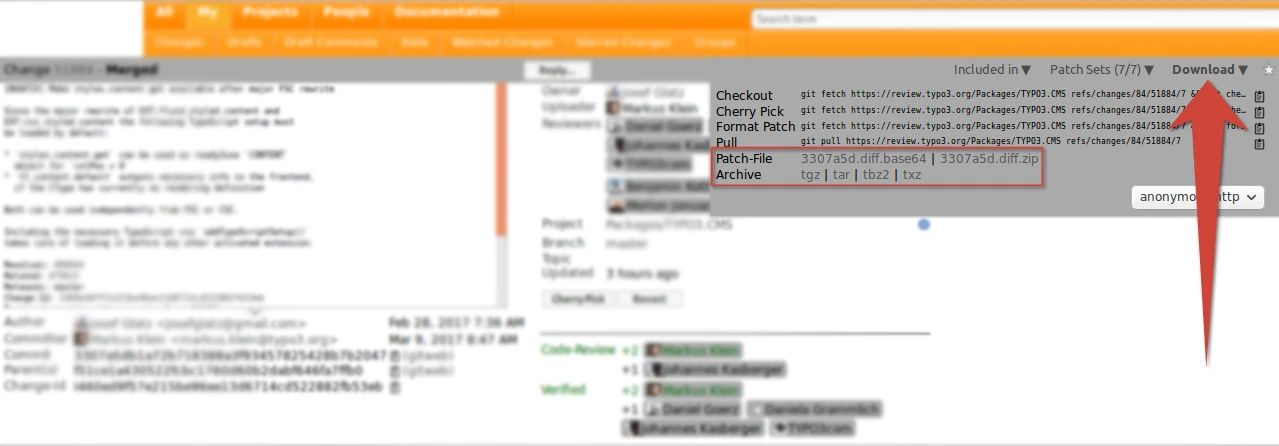
The extracted file from the TYPO3 patch file archive(3307a5d.diff.zip) is therefore stored in a patches folder within the project. This also avoids dependencies on the external TYPO3 review server.
The patch is inserted when composer install is called.

If you want to patch a Neos installation, you can proceed in the same way. The Neos team is currently working exclusively in Github. As an example, the commit c448b4e is to be applied as a patch. Patch files can be generated with Github by appending .diff or .patch to the URL.
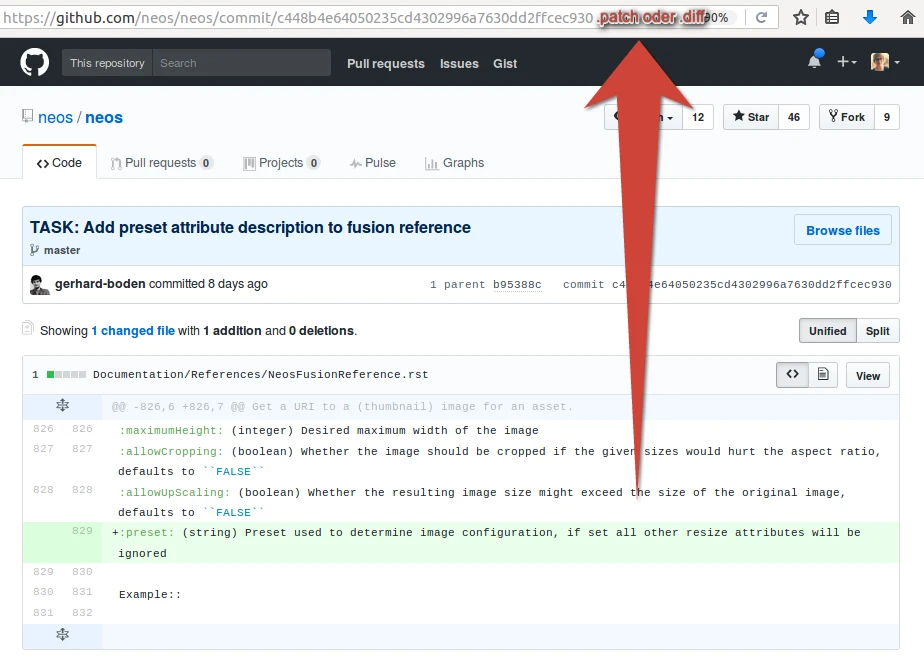
The configuration in composer.patches.json therefore contains a link as a patch source.
{
  "patches": {
    "neos/neos": {
      "TASK: Add preset attribute description to fusion reference": "https://github.com/neos/neos/commit/c448b4e64050235cd4302996a7630dd2ffcec930.patch"
    }
  }
}
The patch is inserted when composer install is called.

If there is no way around a patch, working with tools such as composer-patches is highly recommended. The disadvantages remain within manageable limits and the overview of the patched areas in the project is maintained. If a clear description and thus implicit documentation is added to the configuration for the patches, the probability of knowledge about the patch being lost is very low and colleagues from outside the project also have an immediate insight. The versioning of the patch files and the automation with Composer also greatly reduces the effort required to maintain the patch in the project.