Cancel
Start searching

This search is based on elasticsearch and can look through several thousand pages in miliseconds.
Learn more
TYPO3 is a powerful and highly configurable CMS. The possibilities available to an Backend administrator are virtually endless. However, not every BE user should be an administrator. Too many options bring too many risks, such as deleting pages that shouldn’t be edited at all, or making sensitive data accessible to every editor at Backend. These are reasons to limit permissions. But of course, limiting permissions can also be useful for simplifying day-to-day work with TYPO3. The fewer modules, settings, and features you see, the clearer the Backend becomes. In this post, I want to give you a brief overview of Backend permissions and show you a way to keep track of things even with more complex permission structures. I’ll be focusing on TYPO3 version 6.2, since listing all TYPO3 versions and their differences would go beyond the scope of this post.
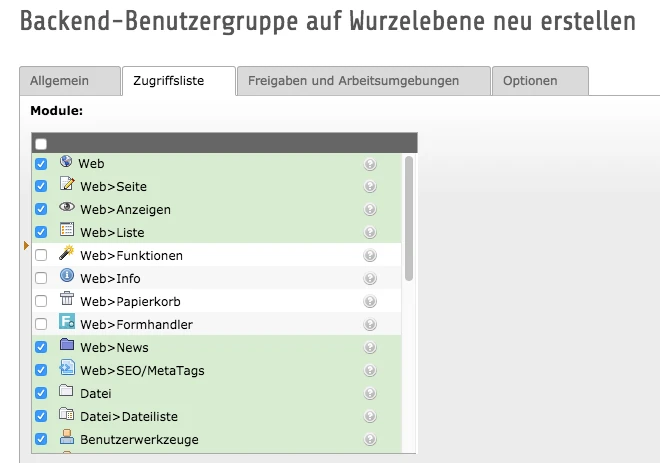
As mentioned earlier, there are a vast number of permission options for BE users. Due to the wide variety of different functionalities, here is only a rough list of the BE permission settings available in TYPO3:
Available Modules (Page, List, Preview, File List, etc.)
Access to tables (view/edit records)
Available page types (pages, links, folders, etc.)
Visible fields from page content (tt_content, tables from extensions, etc.)
Restrictions on available plugins (TYPO3, extensions, etc.)
Restriction to the available language
Workspaces
Database permissions (page tree)
Directory permissions (Fileadmin)
Permissions for file operations (read, write, move, delete, etc.)
Available categories
Restriction to domain
TSConfig (e.g., hide tabs, set default values, etc.)
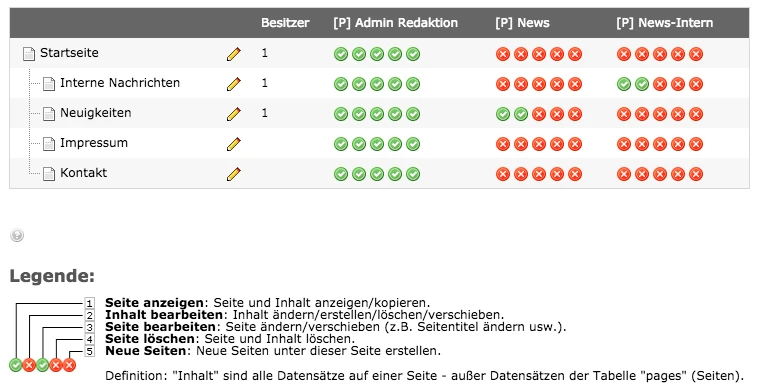
And since, of course, the visibility of the site tree can also be restricted, there is also the Access module, which allows you to set the following permissions:
View page
Edit content
Edit page
Delete page
Create new pages
(+ everything on all subpages)
These permissions are assigned to BE groups. More on that later.
With so many different BE user profiles, there are a great many configuration options. To avoid losing track of everything or having to create a separate group for each user, it’s advisable to logically separate the groups and thenregroup them. We distinguish between the following types:
Name Configuration Used Purpose
Schema
| [ACL] Editor | AccessControlList | ACL settings are configured in these groups. That is, whichmodules, tables, fields, and pluginsareallowed. |
| [ACL][DISALLOW] Editor | AccessControlList:DisallowedPlugins | Since there are not only permissions that allow access but also permissions that deny it, it makes sense to create a separate ACL group forprohibited plugins. Once a BE user has set a plugin to “disallowed” in their permissions, this setting cannot be overridden by another group. |
| [TS] Editor | TSConfig | This group contains allTSConfig configurations. |
| [DBM] Editor | DataBaseMount | This group defines thedatabase mountsand thus determines the visibility of, for example, sysfolders containing data records. |
| [FM] Editor | FileMount | The FileMount group is used togrant accesstoFileAdmin folders that the group is supposed to receive. |
| [L] Editor | Language | Although alanguage restrictionis available under the ACL section, it is better placed in its own group for clarity. This way, you can see directly in a META group which language permissions are assigned to the group and do not have to search for them first in the ACL group. |
| [EXT] tt_news | Extension | These groups are used toconfigure extension-specific settings. An example would be the "tt_news" extension. In this group, it can be quite useful to set all settings—such as ACL, TS, etc.—since permissions for a specific extension are explicitly assigned here. |
| [P] Editor | None (Pagesin the Access module) | This group contains no permissions within the BE group. It is used by theAccess moduleto control access to the page tree in Backend for users in this group. |
| [META] Editor | None | The meta-group is the group that unites all the previously mentioned groups into one and has not set any permissions itself; that is, it consists solely of subgroups (ACL, TS, DBM, P, L, etc.). The advantage of this is that, for example, a "[META] Editor" group can be assigned to the respective editors in Backend, rather than having to assign all the necessary groups (ACL, TS, DBM, FM, etc.) to every BE user. |
The naming convention here is always "[ABBREVIATION_OF_ENTITLEMENT_TYPE] descriptive group name."
Each group contains only the relevant permissions
The groups have "descriptive" names
Filtering by permissions is easy based on the name (e.g., via the database or the TYPO3 Backend search for all language groups → "[L]")
A user is always assigned only one META group
Assigning a group to a user in the Backend is straightforward, as the list of available groups is sorted alphabetically (and thus categorized)
In complex projects, thiscanresult in a very large number of groups
Let’s assume we have a new TYPO3 site and the client has made the following request regarding BE users:
For the new TYPO3 system, we need an authorization concept for:
Editorial administrators who can create pages and content
Editorial staff who can only create content
News administrators who can create pages and news articles
News editors who can only create news items
A user responsible for creating and sending the newsletter
Based on this requirement, I would define the groups as follows:
[META] Editorial Admin
[ACL] Editorial Admin
[DBM] Editorial
[FM] Editorial
[P] Editorial Admin
[TS] Admin
[META] Editorial
[ACL] Editorial
[DBM] Editorial Team
[FM] Editorial
[P] Editorial
[META] News Admin
[ACL] News Admin
[DBM] News
[FM] News
[P] News Admin
[TS] Admin
[META] News Editorial Team
[ACL] News Editorial Team
[DBM] News
[FM] News
[P] News Editorial Team
[META] Newsletter Admin
[ACL] Newsletter Admin
[DBM] Newsletter Admin
[FM] Newsletter Admin
[P] Newsletter Admin
[TS] Admin
[EXT] Direct Mail
Basically, three main groups are needed: one for page design ("Editorial"), one for news content ("News"), and one for the newsletter ("Newsletter"). The site and news design groups are further divided into admins and editorial staff. Since the admins have slightly more permissions than the editorial staff, we need a few different groups. If we now compare the editorial groups “[META] Editorial-Admin” and “[META] Editorial,” we notice that the admin group has the same DBM and FM groups as the editorial group. Since both need to access the same data records (DBM) and files (FM), it doesn’t make sense to create different DBM/FM groups here. The ACL and P groups differ because we do not grant the regular Editorial group permission to create pages (P group) or plugins (ACL group). This is reserved for the “Editorial Admin” group. The same applies when comparing the news groups “News Admin” and “News Editorial.” The “[TS] Admin” group is a generic group that allows the recursive deletion of pages via TSConfig. This is a useful setting that, in this example, is granted only to the admin groups.
The “[META] Newsletter Admin” group could, of course, inherit the “[DBM] News” and “[FM] News” groups. However, in this example, I chose to explicitly use new groups here, since these are different types of users. In the event that additional editorial groups are added, this could lead to further adjustments to the Newsletter Admin settings. In my opinion, a clear separation by functionality makes sense here. In addition, an EXT group for DirectMail is used to grant access to the extension’s Backend modules. Since limited access to DirectMail modules makes little sense, different access permissions for the extension are likely unnecessary. Furthermore, the EXT group offers the advantage that permissions for DirectMail are more likely to be found in this group than in the ACL group, which may have activated or deactivated a much wider variety of configurations. This makes the setup clearer and easier to manage.
If we now want to know what permissions user XYZ has, we can roughly determine this based on the assigned META group. The more descriptive the group names are, the more practical they are. On the other hand, a label that’s too specific—such as “[ACL] News Categories (PHP, JS, HTML, CSS)”—can provide incorrect information immediately after a change if, for example, a new news category is added but the group’s name isn’t updated.
Let’s assume that several months have now passed and the first adjustments to the BE permissions are being made:
To ensure that the newsletter administrator does not accidentally delete any news items, they should only have permission to create a newsletter from the existing news items and to send it.
Since we have assigned separate groups to the Newsletter Admin for news access permissions, all other groups remain unaffected by these changes. The groups "[P] Newsletter Admin" and "[ACL] Newsletter Admin" will be updated to grant only read access to the news.
An area for internal news is needed (hidden behind the FE login), along with a group that has the appropriate access rights to manage this news. Due to the company’s structure, regular news authors must not be allowed to access this news—neither to read nor to edit it. In addition, this group should also be able to maintain the regular news.
So we need a new group to manage internal news that has access to the existing regular news. The group could be structured as follows:
[META] Internal News Admin
[ACL] News-Admin
[DBM] Internal News
[DBM] News
[FM] News
[P] News Admin
[P] News Internal Admin
[TS] Admin
We use the same groups as the "News-Admin" group and extend them with our own DBM and P groups, since access to the file mount and site tree is required for internal news. Of course, you could also define the "[META] News-Admin" group as a subgroup. But this has the disadvantage that, when making adjustments, you would then have to check the subgroup of a subgroup. Furthermore, the “[META] News-Admin” group could be assigned different permissions due to another requirement, which would then also affect this group. It should be safe to assume that changes to one META group do not affect other META groups. You could view this as a kind of convention.
We need to restrict the permissions for editorial users. They should only be allowed to use the content elements "Text," "Text and Image," and "Images." Administrators should continue to have access to all content elements.
The previous permissions only had "allow" settings. For this reason, an additional "ACL-DISALLOW" group is now being used to deny access to content elements: the "[ACL][DISALLOW] All Plugins and Special Page Content" group. This group is now assigned to the META groups "[META] Editorial Team" and "[META] News Editorial Team." As a result, the corresponding users now only have access to content elements and plugins that are not prohibited.
It is highly recommended to separate "allowed" and "prohibited" items into distinct groups. For example, once a specific plugin has been set to "prohibited" within an ACL group, it cannot be re-enabled through any other group. The “once prohibited, always prohibited” principle then forces us to create a new group for the user that contains a new—almostidentical—ACL group in which the plugin is not set to “prohibited.” This would mean maintaining the ACL groups twice and is more prone to errors, more time-consuming, and less transparent.
The editorial team needs access to the ExtList plugin.
If we were to grant access to this plugin in the ACL-DISALLOW group, the "News Editorial" group would also gain access. Since this is not what we want, we now need more "ACL-DISALLOW" groups after all:
[META] Editorial Team
[ACL][DISALLOW] Everything except text, images, and the ExtList plugin
...
[META] News Editorial Team
[ACL][DISALLOW] Everything except text and images
...
Of course, the only difference between the groups is whether the ExtList plugin is checked, but since the “once disallowed, always disallowed” principle applies here, I would go with the approach mentioned earlier. Especially when it comes to blocks like content elements or plugins, it can make a lot of sense to organize them into different groups—both to give the group a descriptive name and to get an overview of what’s blocked by the group without having to edit the group directly. Depending on the project size and the extensions installed, the list of content elements and plugins can quickly become very confusing.
Due to our new branch in England, we need a multilingual website. The permissions must be adjusted so that users from Germany have access only to German pages and content. Users from England must be able to translate German pages and create their own content in English. The newsletter is available only in Germany.
This requirement has a significant impact on our BE authorization. There are several ways to implement this requirement:
Option 1:
We create the language groups "[L] German" and "[L] English." We then rename the META groups and add "(DE)" to the name, e.g., "[META] News-Admin (DE)." Next, we copy the META groups and change the “DE” to “EN.” Now, depending on whether it’s “DE” or “EN,” the respective META groups must be extended to include the corresponding L group.
Option 2:
The META groups remain unchanged, and the respective BE users are assigned the L group for their language.
The second option has the advantage that the number of groups does not increase too much and remains within manageable limits. However, this compromises the readability of the META groups. The information about which language the BE user is authorized to edit is thus stored in the user profile itself rather than in the group. My decision here would depend heavily on whether there are plans to offer even more languages in the future. There will never be a perfect solution, as it always depends on the project’s current and target states.
By structuring BE permissions in TYPO3 in a well-thought-out and logical manner, they can be easily managed and expanded. Administering BE permissions is no simple task in larger projects, but with the necessary discipline and structure, it need not become an unmanageable behemoth.
Anyone who operates a CI/CD infrastructure and repeatedly makes adjustments to BE permissions will quickly become frustrated. Differences in database structures prevent the export of groups to the target system, so changes must be documented and manually transferred to the respective target system. Developers and integrators are only human and can make mistakes—especially when sifting through hundreds of checkbox lists to find the one box that meets the customer’s requirement. That will soon be a thing of the past! The TYPO3 developers are working on a way to offload user permissions to files. The advantage of this is obvious: versionable user permissions. This is perfect for a CI/CD infrastructure, and as long as the configuration files for user permissions are easy to read (perhaps a well-organized YAML file?), there’s no need for documentation on the permissions (which is out of date by the time it’s written anyway).
P.S.: And thanks to Daniela Grammlich for sketching the cover image. If you’d like to see more sketchnotes, click here:https://grammheimlich.de/
It’s quite likely that you still have a few questions, since the topic is quite complex. Please don’t hesitate to ask in the comments or contact us directly by phone at 0721 - 91090.
We’d be happy to help.