Cancel
Start searching

This search is based on elasticsearch and can look through several thousand pages in miliseconds.
Learn more

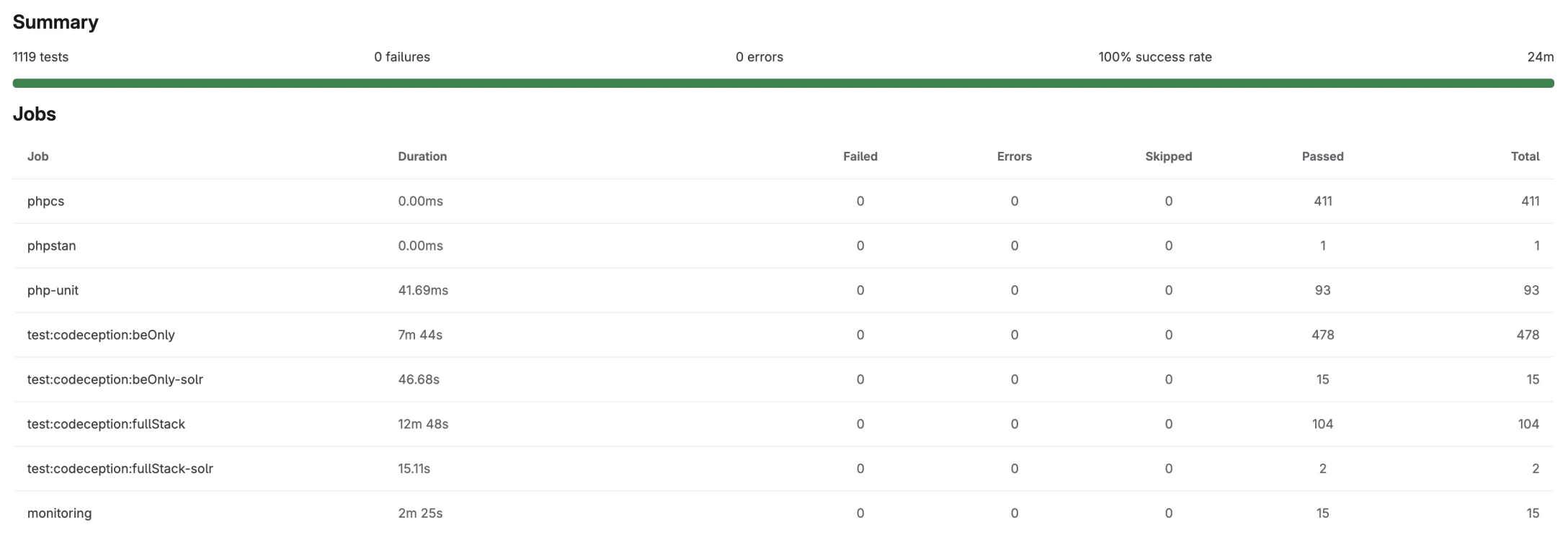
Our tests are run by GitLab CI after every commit and every night (on the main branch).
The stages of a nighttime run:

The test results:
The first step for us is to ensure that all developers on the team write code in the same way. To do this, we use various tools depending on the programming language:
Each of these tools works the same way—it checks the written code against the style specified in a corresponding configuration file and ensures that no developer deviates from it. Of course, how strict or flexible the rules are can vary depending on the team—with the exception of phpcs, which uses the PHP coding style defined by PSR and can even check for different variants depending on the version. What makes these checks special is that they are run as part of the Git workflow before a commit, thereby preventing any developer from unintentionally pushing code with an incorrect coding style into the central repository—when it comes to work in progress, you can temporarily skip this step, but doing so requires a very deliberate decision.
The next step is phpStan. This tool checks whether the code is written in a way that ensures data types are maintained and consistent. For example, it’s not enough to simply define an array as an array—phpStan requires us to specify that it is, for instance, an array of numbers with strings as keys. phpStan can be configured to 9 (soon to be 10) levels, with each level being stricter than the one before it. In our team’s largest project, we’re currently using Level 8—Level 9 would require us to handle the `mixed` data type more precisely, which, in an environment like TYPO3 with collections and arrays that are quite flexible in places, would entail a greater effort in defining them.
These checks ensure that data types remain consistent even across multiple layers of code and third-party code, and that functions cannot be used incorrectly, which helps improve consistency in new developments.
Compared to the linting tests, running Stan takes a relatively long time, which is why we’ve decided to run it only as part of the pipelines and not directly within the Git workflow.
As a team, we have decided to avoid deploying third-party libraries and packages with known security vulnerabilities to customer servers as much as possible. To this end, we run the commands `npm audit --omit=dev` and `composer audit`, which check the packages installed via the respective package managers against central CVE databases and flag any affected installed versions. For npm, we ignore the dev packages, since these are excluded from deployments and therefore aren’t executed on customer servers anyway.
This step was important enough to us that we run it as part of the Git workflow with every push, and—as with the linting steps—a developer can deliberately skip the test; this is necessary, for example, when you don’t want to perform package updates multiple times across several branches. We can push the affected versions to branches, perform the update in the main branch, and then rebase the other branches.
We’re also aware that security vulnerabilities can come to light even when we don’t need to push right away or when many pipelines are running. That’s why we have additional processes in place to review existing code and releases, but that’s a topic for another blog post.
This was the first of three articles on our testing. Stay tuned for Part 2, which covers our approach to unit tests and other tests using PHPUnit, and for Part 3, which covers API and browser testing.
Whether you’re an agency, an industrial company, or an independent development team: If you want to establish or further develop agile testing processes, we’ll support you with our expertise—whether through hands-on workshops or direct, project-based collaboration. We’ll guide you through every step—from introducing agile testing methods and optimizing existing workflows to developing and implementing customized testing strategies. Feel free to reach out to us so we can work together to take your quality assurance and development processes to the next level!