Cancel
Start searching

This search is based on elasticsearch and can look through several thousand pages in miliseconds.
Learn more

For the Mac, there is the Keyboard Maestro program, which allows you to define keyboard shortcuts that automatically relieve the user of most of the typing work. "mfg" then becomes "sincerely yours". Of course, these are also features that are already included in the native Mac OS, but Keyboard Maestro has many more features. For example, "if queries" are possible, you can use variables and also develop entire program sequences in such a way that frequently occurring keyboard sequences can be completed reliably and quickly.
The program can also calculate and use times and dates and control many programs directly
Almost anything you can imagine can serve as a trigger. Whether a macro is executed when you type a text, enter a keyboard shortcut, or when a certain program is started or ended, or you log into a WLAN. These are just a few examples of the more than 150 different triggers.
But let's stick to the small problem, which can also be solved with Keyboard Maestro. I myself write "sit" instead of "ist". Of course, I don't want the word "sitzen" to be corrected to "istzen". With the following macro, this is reliably corrected by Keyboard Maestro. The idea is not only to replace "sit", but the trigger should only be executed when the word is "finished". So a space, comma, period, ... follows the "sit".
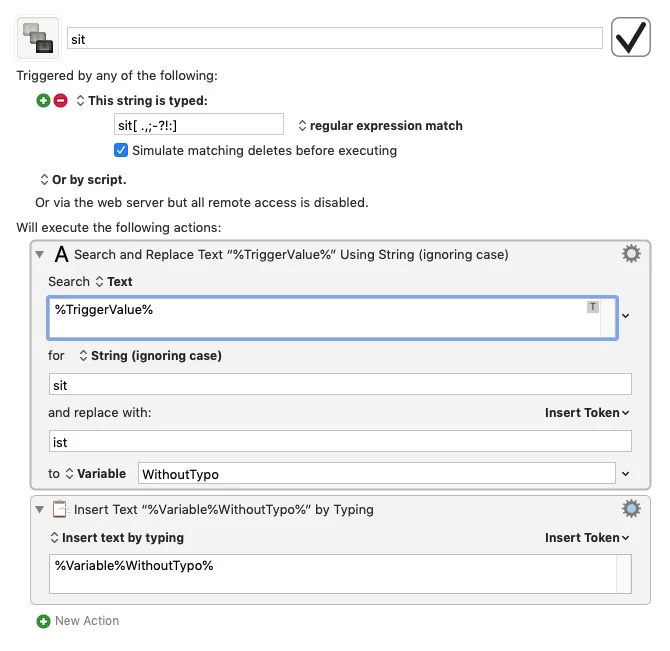
The file "Typo Macros.kmlibrary" contains my favorite typos. Anyone who owns Keyboard Maestro is welcome to use it. I would be happy to receive feedback and additions.