Cancel
Start searching

This search is based on elasticsearch and can look through several thousand pages in miliseconds.
Learn more

For the Mac, there’s a program called Keyboard Maestro that lets you define keyboard shortcuts to automate most of the typing for the user. “mfg” then becomes “Best regards.” Of course, these are features that are already included in native macOS, but Keyboard Maestro offers many more. For example, it supports “if” statements, allows you to use variables, and enables you to develop entire program sequences so that frequently used keyboard shortcuts can be executed reliably and quickly.
The program can also calculate and use times and dates, and it can directly control many other programs
Almost anything you can imagine can serve as a trigger. Whether a macro runs when you type text, enter a keyboard shortcut, start or close a specific program, or log into a Wi-Fi network. These are just a few examples of the more than 150 different triggers available.
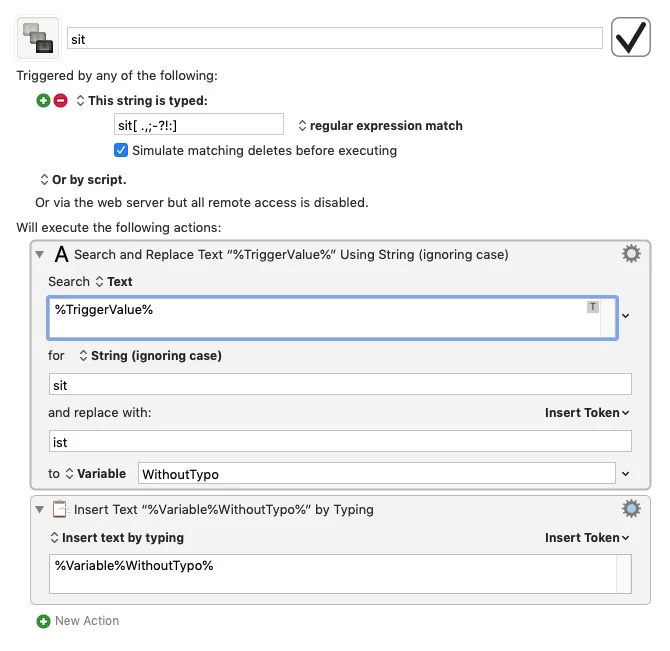
But let’s stick with this little problem, which can also be solved with Keyboard Maestro. I myself type “sit” instead of “ist.” Of course, I don’t want the word “sitzen” to be corrected to “istzen.” The following macro ensures that Keyboard Maestro corrects this reliably. The idea here is not just to replace “sit,” but to ensure that the trigger is executed only after the word is “complete”—that is, after a space, comma, period, etc., follows “sit.”
The file "Typos Macros.kmlibrary" contains my favorite typos. If you have Keyboard Maestro, feel free to use them. I'd love to hear your feedback and suggestions.