Cancel
Start searching

This search is based on elasticsearch and can look through several thousand pages in miliseconds.
Learn more

With Neos as a content application platform, even the most complex online projects can be implemented. Fusion, as a powerful domain-specific language, plays a central role in the implementation. Like any language, Fusion is difficult to learn just by reading the documentation. Examples of how to solve specific problems can help, and of course: just try it out!
However, large and evolved projects with many dependencies do not make it easy to simply try things out. For frontend code in HTML, CSS and JavaScript, there are project-independent online platforms such as JsFiddle or CodePen, which make testing code snippets and sharing examples child's play. Something like this would of course also be very practical for front-end rendering in Neos.
Sebastian Helzle also formulated this in a tweet. So the idea made it to our last Just-Do-It-Day as a project and a small team set about implementing the idea of an online code editor and live renderer for Neos Fusion.
After just a few hours, the first code was written and the first live rendering was successful. However, there was still a lot to do from the proof of concept to a presentable application. So today we are all the more pleased to present FusionPen to the Neos community.
Whenever I‘m on codepen or any other code editing page I want the same for Fusion in #NeosCms. Would help a ton to quickly show examples and play with ideas.
— Sebastian Helzle (@sebobo) November 29, 2019
Fusion has been part of Neos as a scripting language since the beginning. In the early days, however, it was mainly used as glue code between the data of the content management system and rendering with Fluid Templates.
In recent years, however, Fusion has become the powerful and central rendering language in Neos. In contrast to the alternative Fluid, Fusion is particularly well suited to a component-driven page structure and therefore enables well-structured and reusable rendering code to be written; an absolute must in large projects. Since the introduction of AFX, Fusion has completely replaced Fluid in our Neos projects.
In addition to basic language constructs, Fusion consists of so-called eel statements: single-line operations for processing content. FlowQuery is the query language with which the tree structure of the content repository can be traversed and any information can be extracted. Configurable fusion objects then supplement the language with constructs such as loops or conditions.
FusionPen now makes it very easy to enter and test smaller and larger code examples independently of the project.
At least one Fusion prototype always serves as the basis. Any number of prototypes can be defined in a pen - the first prototype found is rendered. The naming scheme of the prototypes is left to the user.
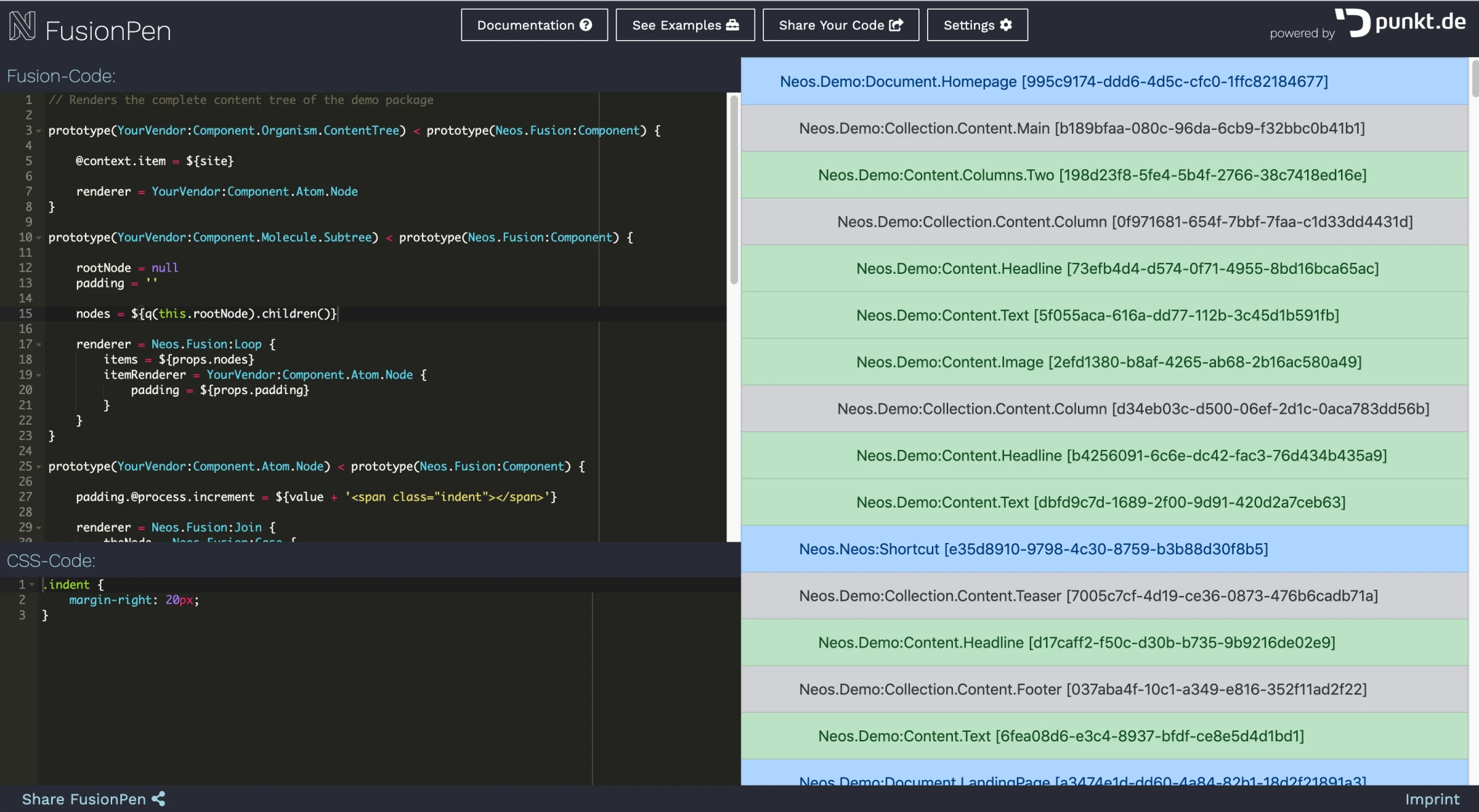
By clicking on "Share your code", the code is saved in the database and a unique link to the current code version is generated. Changes to the code generate new links so that different versions can also be saved.
Under "Settings" you can choose from a whole range of CSS frameworks. This means that the code is not only functional but also attractive with just a little suitable markup.
Even if a lot is possible with Fusion alone, it only gets really interesting when you can work with data. Traversing through the tree of the content repository using FlowQuery can be quite a headache for beginners.
Therefore, this should also be testable in FusionPen. The content repository behind the platform is filled with the data set of the official Neos demo site. If no local demo site is currently available to familiarize yourself with the content structure, you can take a look at this example or in detail on the demo site of Networkteam, for example.
For projects with more than 50,000 nodes, there is no way around Elasticsearch support in my opinion. FlowQuery alone quickly becomes inefficient, not only for page searches, but also for sorting, paginating and filtering documents such as news articles or products.
Since not only the operations of the Search-Eelhelper need to be understood in order to use it, but also the Elasticsearch functions behind it, the learning curve here is particularly steep and examples are especially valuable. Therefore, the Elasticsearch content repository adapter is also installed and usable on FusionPen.
A small collection of code examples is to be created and constantly expanded under the "Examples" section. We also welcome contributions from the community. If you have written an example that is missing from the list, please send it to us.
The platform is still in its infancy. We still have a few ideas that we would like to implement. For example, we would need correct syntax highlighting for Fusion. Code completion for Fusion prototypes and eel helpers would also be very helpful.
We hope the project helps you and look forward to your feedback. Either here under the blog entry or in the #fusionpen channel in the Neos Slack.