Cancel
Start searching

This search is based on elasticsearch and can look through several thousand pages in miliseconds.
Learn more

Every developer has their own set of tools and applications they feel comfortable using. But in the fast-paced and ever-changing world of software development, it never hurts to step outside your comfort zone and try something new. Here’s a short list of useful tools and little helpers that we use here at punkt.de.
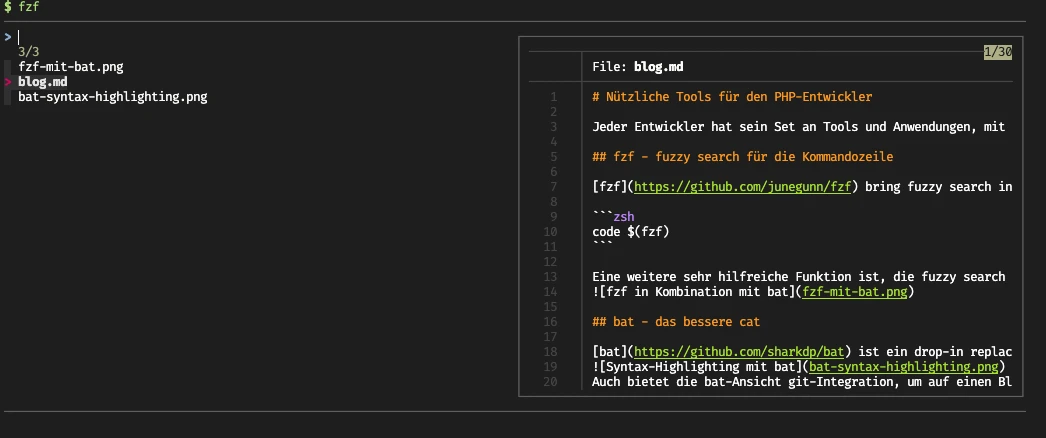
fzf brings fuzzy search to the terminal. As described on the GitHub page, it can be installed on a wide variety of operating systems. In addition to Apple Mac and Linux, installing it on Windows is also straightforward. It’s also highly recommended to install the key bindings and fuzzy completion to take full advantage of all of fzf’s features. After successful installation, you can use fzf to perform a fuzzy search for files within the current directory and all subdirectories. It’s best to combine this with launching an editor—such as Visual Studio Code—so you can open the found file right away:
code $(fzf)
Another very helpful feature is fuzzy search in the terminal history. If you've installed the fzf key bindings, you can launch fuzzy search using the usual keyboard shortcut for history search. On a Mac, that’s Ctrl+R, and the interactive fuzzy search opens immediately with all history entries. This feature is most useful when the terminal history is as large as possible. It’s best to increase the number of history entries to the maximum—or as many as possible—so you can still find commands from days or weeks ago. As described on the GitHub page, fzf can be customized to your preferences and needs, or combined with other tools such as bat:
bat is a drop-in replacement for the well-known cat command, which is likely to appeal especially to developers who want more color in their terminal. bat works similarly to cat but offers several useful features. Probably the most noticeable addition is the introduction of syntax highlighting and line numbering:
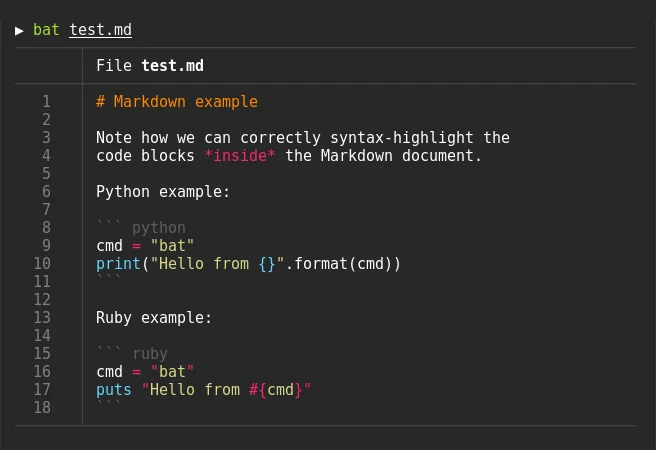
The bat view also offers Git integration, allowing you to see at a glance where changes were made in the file you're viewing. Another great feature becomes apparent when you open a particularly long file in the terminal. Instead of writing the entire file contents to the terminal like `cat` does, bat opens an interactive view of the files within the available viewport, which you can navigate using the mouse or arrow keys. This is especially advantageous when working in a terminal with a split-screen view. As noted on the GitHub page, bat can be installed on all common desktop and server operating systems. It also offers a wide range of customization options.
Both fzf and bat enhance convenience and productivity when working in the terminal. Therefore, we plan to pre-install both tools on our proServers. With these handy tools, we aim to further improve the experience of using our hosting service—as always—and make it as convenient and productive as possible for our customers.
PHP Inspections (EA Extended) is a smart plugin for the PHPStorm IDE. It expands on PHPStorm’s standard error and warning messages by providing suggestions for code refactoring, identifying code duplication, flagging security and performance issues, and much more. In some cases, the suggested changes can be applied immediately using a keyboard shortcut, which greatly speeds up error correction for many minor issues. The suggestions are detailed and help you better understand the problem being flagged. However, it doesn’t just flag errors. As a developer, you also receive suggestions for improving your code style, providing continuous feedback on how you can improve.
The PHP composer.json support plugin extends PHPStorm's capabilities for working with composer.json by adding autocomplete for packages and package versions, as well as syntax checking for composer.json files. The interactive autocomplete feature makes it very easy to edit composer.json and allows you to install the desired PHP package in the desired version with just a few keystrokes. Thanks to this plugin, you can also execute Composer commands with a single mouse click via a menu in the top bar. Auto-completion helps prevent errors, which in turn boosts productivity. You also don’t have to leave the IDE to search for the package you want. Another great feature is that the plugin displays the actual installed version of a package when you hover your cursor over the package’s line.
These are some of the tools we use when developing our projects, and they have a positive impact on our work.