Cancel
Start searching

This search is based on elasticsearch and can look through several thousand pages in miliseconds.
Learn more

Throughout this tutorial, we’ve created our own site package with custom node types that allow us to manage domain-specific content—in our example, the content of a wine shop. In this section, we’ll focus on making all elements of the site—especially the content—available in multiple languages. As always, all the changes required to achieve this can be tracked in detail in the corresponding Git repository.
The following parts of the Neos workshop have been published so far. The website created in those parts serves as the basis for this workshop part:
Before we begin the actual work on making the content multilingual, it makes sense to take a closer look at the theory behind it: the Content Dimensions.
The Content Dimensions concept makes it possible to store a node within the Neos Content Repository in multiple variants. One such variant or dimension could be the language, for example, while another could be the website’s target audience. This allows multiple representations of the same content to be offered using a single-tree approach.
The concept is best explained with an example, as illustrated by the adjacent graphic. Suppose the standard text on our site is written in German and is aimed at private wine enthusiasts. To offer the site in multiple languages, a “Language” dimension is added. This dimension can have any number of “dimension presets”; in our case, these are the languages “English” and “French.” Language is thus a dimension in which a content node can exist in different variants and is certainly the most common use case for content dimensions.
There is no limit to the number of dimensions. In this example, we’ll add a second dimension, “Audience,” which allows us to offer our content to different target groups. While our content is aimed at private wine enthusiasts by default, we can use an additional dimension to offer specialized content for our target group of professional sommeliers. And, of course, all combinations of dimensions are possible. For example, the English-language content can exist in both target audience variants.
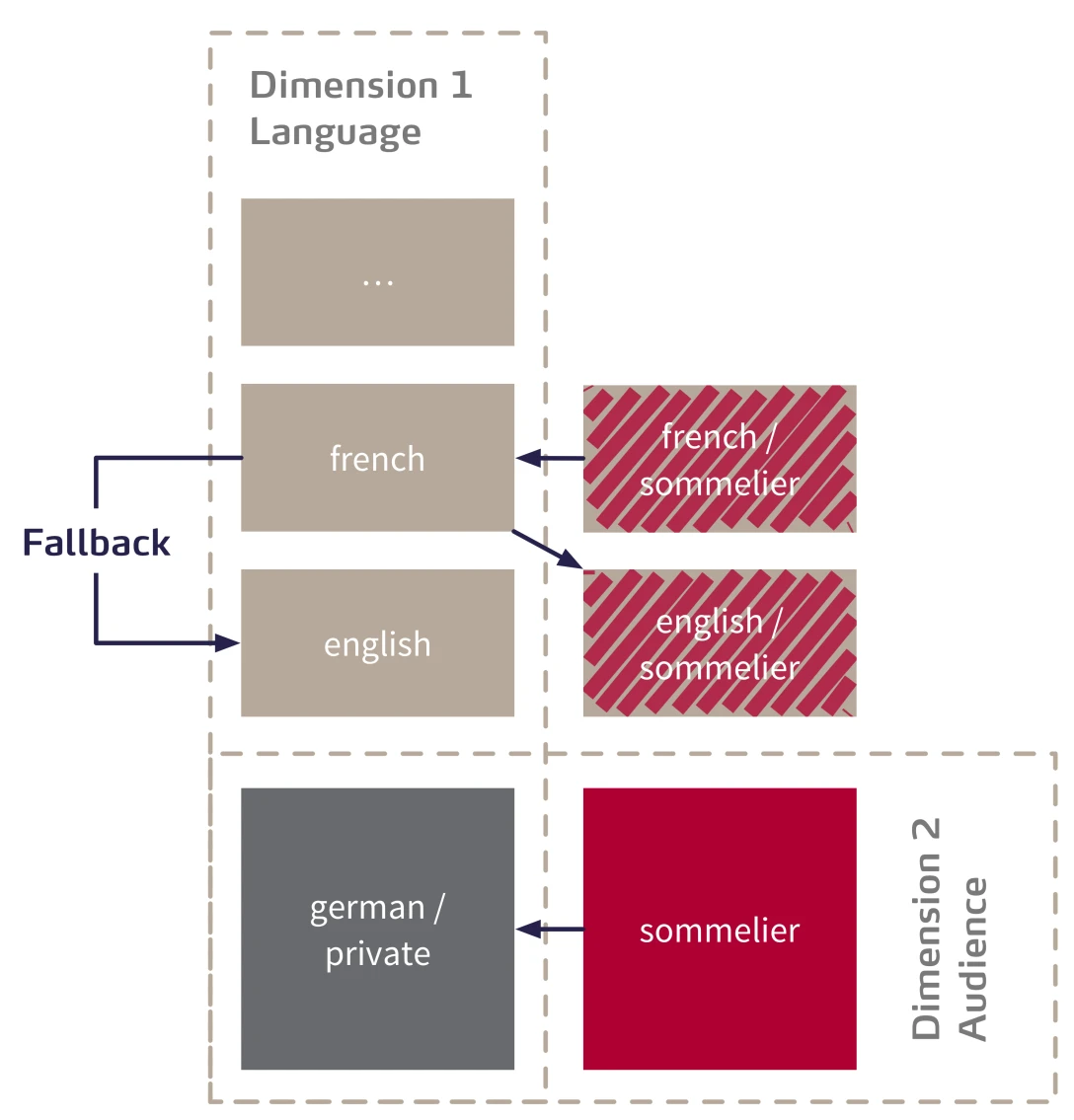
In Neos, content is always retrieved and rendered based on a context. An example of a context here would be: "French for Sommeliers." In the event that requested content is not available in this specific context, any number of fallbacks can be defined. If the content is not available in this context, the system can first search for content in standard French and then in the “English for Sommeliers” variant.
However, fallbacks can also be intentionally omitted. If a page is not translated for a specific context, it will not be listed in the menu. In the following, we will limit ourselves to one dimension and make our page translatable into English and French.
Now that we've reviewed the theory behind content dimensions, we can begin configuring a dimension for language. To do this, we'll add the "language " dimension to the Settings.yaml file in the Neos.ContentRepository.contentDimensions namespace.
In this example, we assume German is the default language, so we set the values for `default` and `defaultPreset` to "de." The `label` and `icon` values are used to style the language selector in the Neos Backend.
Next, the presets for the language dimension are configured. Each preset consists of a label for identification, the ` uriSegment`, which identifies the context in the page’s URL, and the `values`, the valid values for a given context. The list of `values` specifies the order in which the content repository is searched.
Specifically, for our configuration, this means: If a page is to be rendered in the “en” context, the content repository is searched for data corresponding to this preset. If no translation for English is available, the page is not displayed. For French, “en” is configured as the fallback. Therefore, if a requested page is not found in the French translation, the system will next search for the English version.
	Neos:
	  ContentRepository:
	    contentDimensions:
	      language:
	        label: Language
	        icon: icon-language
	        default: de
	        defaultPreset: de
	        presets:
	          de:
	            label: Deutsch
	            values:
	              - de
	            uriSegment: deutsch
	          en:
	            label: English
	            values:
	              - en
	            uriSegment: english
	          fr:
	            label: Français
	            values:
	              - fr
	              - en
	            uriSegment: francais
Konfiguration der Content Dimensins in der Settings.yaml
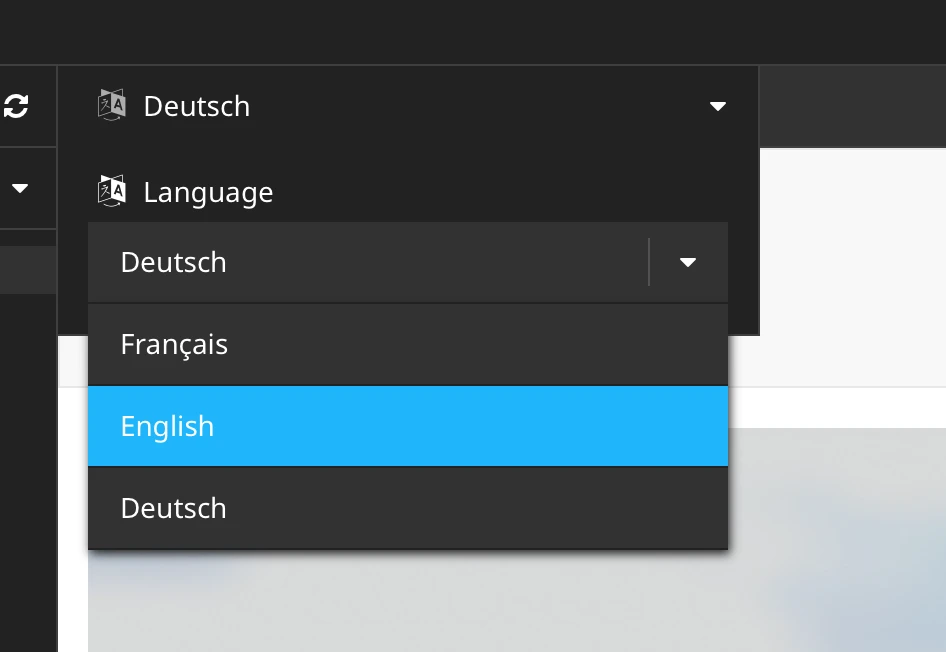
Once the content dimensions have been configured with presets, a dropdown menu appears at the top of the content module in the Backend, allowing you to select presets for the configured dimensions—in our case, the language. If the dropdown menu does not appear, it is usually due to the browser cache. Clearing the browser’s entire content cache will resolve the issue.
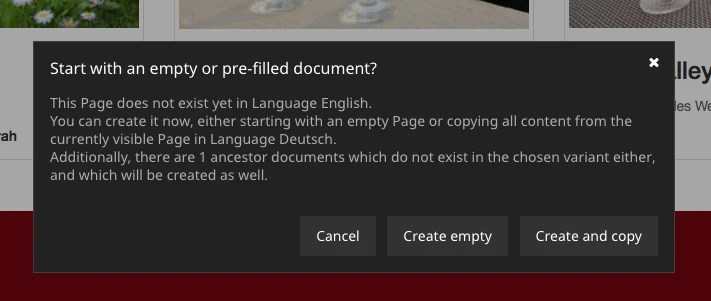
When you select a different language—for example, English—two options are offered for translating the page. “Create Empty” creates the page without any content, while “Create and Copy” copies the page with all structural and content elements so that they can be translated afterward.
Anyone who has followed the tutorial this far has already created several pages and pieces of content. Nodes created in the content repository before configuring the content dimensions must now be marked with the configured default preset.
This is done through a special node migration, which is initiated with the command:
./flow node:migrate 20150716212459Befehl zur Migration vorhandener Nodes in die Standardsprache.
is performed. All existing nodes without a dimension configuration are now assigned to our defined default, "de."
Next, we need the language menu so that visitors can select an alternative language. Neos offers a Fusion prototype for this type of DimensionMenu, which renders a ready-made list of links to the available Dimension presets. The DimensionMenu can be integrated into the template just as easily as the page menu.
languageMenu = Neos.Neos:DimensionsMenu {
    dimension = 'language'
}
Instanziierung des Sprachmenüs in der Datei Root.fusion
Specifying a dimension causes only that dimension to be rendered, even if other dimensions have been defined. Additional parameters are available to control how the menu is rendered. For example, you can explicitly specify which presets to use.
The complete reference for the DimensionMenu Fusion object can be found in the documentation.
In addition to editorially maintained content, the templates for page and content elements contain predefined labels and text blocks. For translation purposes, these text blocks are extracted from the templates and placed into separate translation catalogs.
Neos Flow uses the "XML Localization Interchange File Format" (XLIFF) standard for translations.
In our example, the .xlf files are stored underResources/Private/Translationsin the site package. Within the Translations folder, a separate folder is created for each language, each containing a "Main.xlf" file to hold the translations.
Translations can be split into as many files as needed for better organization and named appropriately. However, since the Flow Localization Framework looks for the file Main.xlf by default without requiring further configuration, we follow this convention.
The overall directory structure looks like the one shown here.
Resources/
  Private/
    Translations/
      en/
        Main.xlf
      de/
        Main.xlf
Die Verzeichnisstruktur der Übersetzungsdateien
The strings to be translated are stored in <trans-unit> tags in these files. Each <trans-unit> element contains a <source> element , which holds the text in the source language, and optionally a <target> element for the target language.
The complete XLIFF data structure for the source language—in our case, German—looks like this:
<?xml version="1.0"?>
<xliff version="1.2" xmlns="urn:oasis:names:tc:xliff:document:1.2">
        <file original="" source-language="de" datatype="plaintext">
                <body>
                        <trans-unit id="wine.grape">
                                <source>Traube</source>
                        </trans-unit>
                </body>
        </file>
</xliff>
Datei Main.xlf im Verzeichnis Resources/Private/Translations/de/
"wine.grape" is the XLIFF identifier, which must be unique within the package and can be used in the templates. It’s a good idea to use meaningful identifiers here. Separating terms with periods is best practice. In our case, we describe the label "grape" in the "wine" node type.
The file for a target language contains the source string as well as the translation in the <target> field.
<?xml version="1.0"?>
<xliff version="1.2" xmlns="urn:oasis:names:tc:xliff:document:1.2">
        <file original="" source-language="de" target-language="en" datatype="plaintext">
                <body>
                        <trans-unit id="wine.grape">
                                <source>Traube</source>
                                <target>Grape</target>
                        </trans-unit>
                </body>
        </file>
</xliff>
Datei Main.xlf im Verzeichnis Resources/Private/Translations/en/
In addition to the feature shown here, the Neos Flow Internationalization & Localization Frameworkoffers several other capabilities, such as placeholders in translated texts and support for singular and plural forms. You can find the complete documentation here.
Once the files are in place, we can now access this translation table in Fluid and Fusion.
In Fluid Templates using the "f:translate" view helper:
{f:translate(id: 'wine.grape', package: 'WL.WeinLaden')}Or, when combined with the corresponding EelHelper:
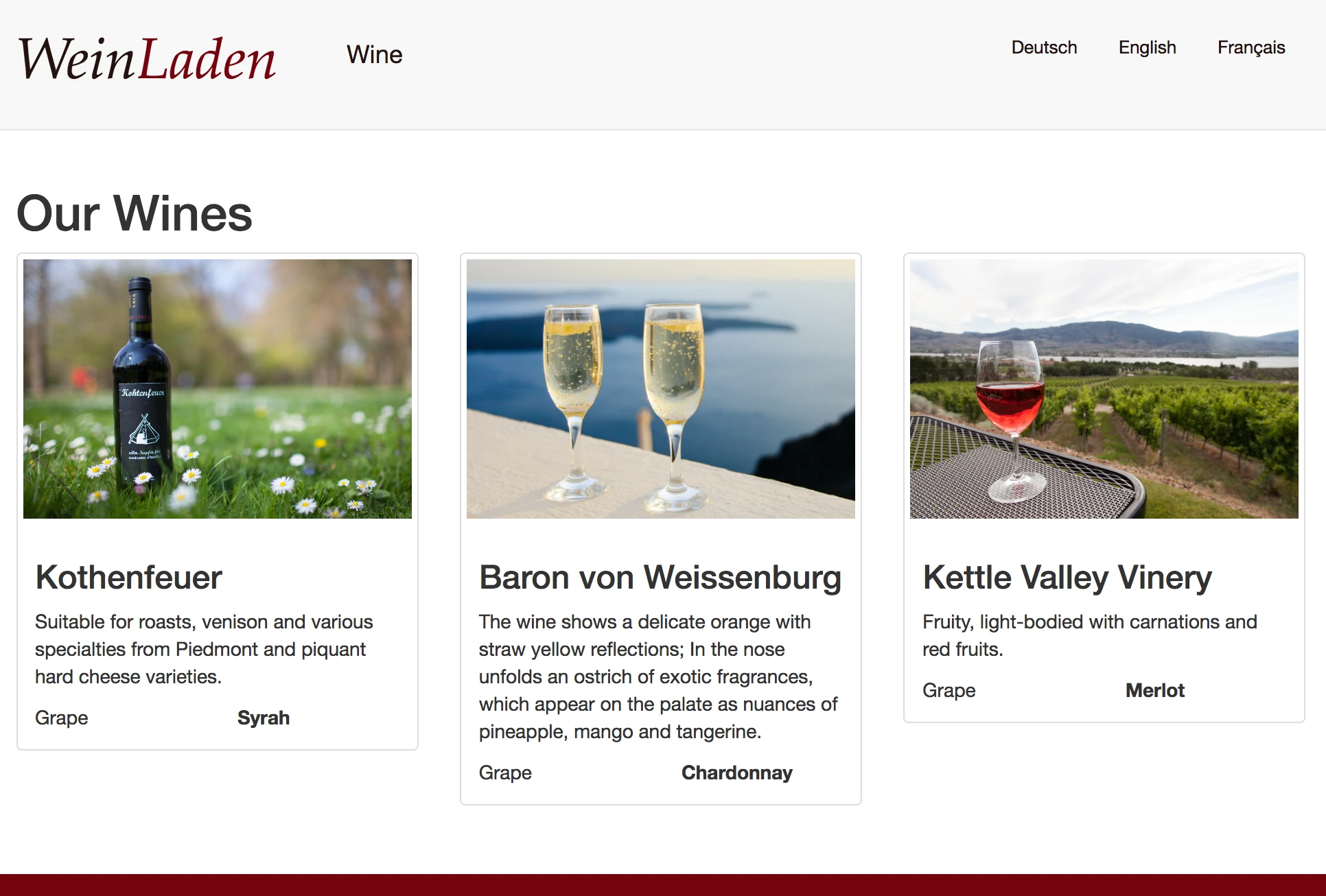
grapeLabel = ${Translation.translate('wine.grape', null, [], 'Main', 'WL.WeinLaden')}Now we have all the components we need to translate the page in its entirety. It might look something like this:
I hope this part of the workshop has helped you understand how to build multilingual websites with Neos. As mentioned earlier, the code needed for this is, as always, available on ourGitHub repository.
Please feel free to use the comment section below for any questions or feedback on this part of the tutorial.
Have fun implementing it!