Cancel
Start searching

This search is based on elasticsearch and can look through several thousand pages in miliseconds.
Learn more


With the Neos Form Framework, which is included in the standard Neos installation, you can create both simple contact forms and complex, multi-page forms with validation. It also offers various extension points for customizing the framework to meet your specific needs.
In this part of the workshop—in line with the topic covered so far—I’ll show you how to use the Form Framework to implement a form for booking a wine tasting. This workshop section builds on the previous parts. As always, a complete overview of the code required for this can be found in the workshop’s GitHub repository.
The following parts of the Neos workshop have been published so far. The page created in Parts 1–3 serves as the basis for this workshop part:
Forms are configured using YAML files. Each form definition consists of the following parts:
To define our form, we create a new file named `registration-form.yaml` in the `Resources/Private/Form/` directory, which we will create.
The form definition begins with general information, such as the unique identifier and a descriptive name.
This is followed by the definition of the elements to be rendered, which can be specified in a nested structure. So-called container elements can be used to structure the form. The container elements then contain the actual form fields.
The top-level “renderable” defines the form page using the structuring type `Neos.Form:Page`. The page, in turn, has its own “renderables” section, which is used to define the next level of elements—in our case, the form fields themselves.
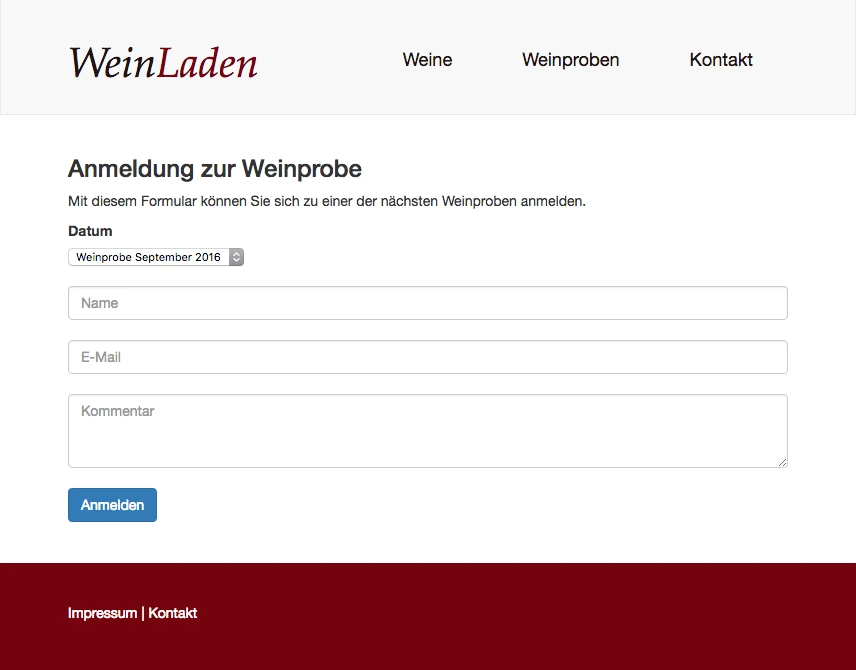
In the example, simple text fields are used for name and email, a multi-line field for the comment, and a select field for choosing the event. Each element requires a unique identifier, which can also be used later to access user input. In addition, further options are available for configuring the fields.
By specifying validators, you can define required fields and validate user input. In the example, we use the Neos.Flow:NotEmpty validator to designate required fields. TheNeos.Flow:EmailAddress validator checksthe input to ensure the email address is valid.
type: 'Neos.Form:Form'
identifier: 'registration-form'
label: 'Anmeldung zur Weinprobe'
renderingOptions:
  submitButtonLabel: 'Anmelden'
renderables:
  -
    type: 'Neos.Form:Page'
    identifier: 'registration'
    renderables:
      -
        type: 'Neos.Form:SingleSelectDropdown'
        identifier: 'date'
        label: 'Datum'
        properties:
          options:
            'September 2016': 'Weinprobe September 2016'
            'Oktober 2016': 'Weinprobe Oktober 2016'
            'November 2016': 'Weinprobe November 2016'
      -
        type: 'Neos.Form:SingleLineText'
        identifier: 'name'
        validators:
          - identifier: 'Neos.Flow:NotEmpty'
        properties:
          placeholder: 'Name'
      -
        type: 'Neos.Form:SingleLineText'
        identifier: 'email'
        validators:
          - identifier: 'Neos.Flow:NotEmpty'
          - identifier: 'Neos.Flow:EmailAddress'
        properties:
          placeholder: 'E-Mail'
      -
        type: 'Neos.Form:MultiLineText'
        identifier: 'comment'
        properties:
          placeholder: 'Kommentar'
          rows: '3'
Formular Definition in Resources/Private/Form/registration-form.yaml
In addition to the fields used in the example, the Form Framework defines many other elements and validators that can be used directly.
Structural Elements
| Type | Description |
|---|---|
| Neos.Form:Page | A form page; a multi-page form is possible. |
| Neos.Form:Section | A section within a form page. |
Special Input Fields
| Type | Description |
|---|---|
| Neos.Form:DatePicker | A single-page form; a multi-page form is possible. |
| Neos.Form:FileUpload | Section within a form page. |
| Neos.Form:StaticText | Display of static text. |
Standard Input Fields
| Type | Description |
|---|---|
| Neos.Form:SingleLineText | Simple text field. |
Neos.Form:Password Neos.Form:PasswordWithConfirmation | Simple password entry. Password entry with confirmation field. |
| Neos.Form:MultiLineText | Multi-line text. |
| Neos.Form:Checkbox | Single checkbox field. |
| Neos.Form:SingleSelectDropdown | Dropdown field. |
| Neos.Form:SingleSelectRadioButtons | Radio button. |
| Neos.Form:MultipleSelectDropdown | Select list for multiple selections. |
| Type | Description |
|---|---|
| Neos.Flow:NotEmpty | The field must not be empty. This defines a required field. |
| Neos.Flow:DateTimeRange | The valid time period is defined using the earliestDate and latestDate options. |
| Neos.Flow:Alphanumeric | Alphanumeric characters can be used. |
| Neos.Flow:Text | Text must not contain any XML tags. |
| Neos.Flow:StringLength | The required length limit can be specified using the " minimum " and " maximum " options. |
| Neos.Flow:EmailAddress | Validates for a valid email address. |
| Neos.Flow:Integer | Checks for an integer. |
| Neos.Flow:Float | Checks for a valid float value. |
| Neos.Flow:NumberRange | Checks for an integer within a valid range specified by the ` minimum ` and ` maximum ` options. |
| Neos.Flow:RegularExpression | Validates against a regular expression specified by the ` regularExpression` option. |
With the configuration above, the form can already be embedded on the page. To do this, the storage path for the forms must be changed so that the form configurations are looked for in our own site packages. Under "Configuration" in our site package, we create a Settings.yaml file and add the following configuration:
Neos:
  Form:
    yamlPersistenceManager:
      savePath: 'resource://WL.WeinLaden/Private/Form/'
Configuration/Settings.yaml
In addition, our form must be added as an option in the Neos Form NodeType so that it can be selected in the Inspector.
'Neos.NodeTypes:Form':
  properties:
    formIdentifier:
      ui:
        inspector:
          editorOptions:
            values:
              'registration-form':
                label: 'Anmeldung zur Weinprobe'
Configuration/NodeTypes.yaml
Finishers are used to define what should happen to the form data after it is submitted. The two finishers are defined in the same file as all other form settings.
With the Neos.Form:Confirmation, we specify the text that will be displayed in place of the form after the form has been successfully submitted. In the text we define using the message option, we can also include information provided by the user.
The second finisher, of type Neos.Form:Email, then sends the form submissions via email. To use this finisher, the PHP package “SwiftMailer” must also be installed—this step is explained in the next section.
All important email details, such as the recipient and sender addresses and the subject line, can be passed directly to the finisher via options. The actual email text is stored in a separate file to avoid unnecessarily bloating the YAML file. In this example, we send a plain-text email whose content is read from the file Resources/Private/Templates/Mail/Registration.txt.
finishers:
  -
    identifier: 'Neos.Form:Confirmation'
    options:
      message: >
        <h3>Vielen Dank für Ihre Anmeldung!</h3>
        <p>Wir freuen uns, Sie bei unserer Weinprobe im {formState.formValues.date} begrüßen zu dürfen.</p>
        <p>Ihr Weinladen Team</p>
  -
    identifier: 'Neos.Form:Email'
    options:
      templatePathAndFilename: 'resource://WL.Weinladen/Private/Templates/Mail/Registration.txt'
      subject: 'Neue Anmeldung zur Weinprobe'
      recipientAddress: 'anmeldung@weinladen'
      recipientName: 'Weinladen'
      senderAddress: 'no-reply@weinladen'
      senderName: '{name}'
      replyToAddress: 'no-reply@weinladen'
      format: 'plaintext'
Die konfigurierten Finisher in Resources/Private/Form/registration-form.yaml verarbeiten die Formulardaten.
Hallo liebes Weinladen Team,

eben ging eine neue Anmeldung für die Weinprobe im {form.formState.formValues.date} ein:

Name:     {form.formState.formValues.name}
E-Mail:   {form.formState.formValues.email}
Kommentar:{form.formState.formValues.comment}

Viele Grüße
Definition des Mailtextes in Resources/Private/Templates/Mail/Registration.txt
In addition to the finishers used above, the Form Framework offers even more options for processing form data. Of course, you can also create your own classes and use them here for processing.
| Type | Description |
|---|---|
| Neos.Form:Confirmation | Displays a configurable text message after submission. |
| Neos.Form:Email | Sends an email with the contents of the submitted form. |
| Neos.Form:FlashMessage | Displays any flash message after submission. |
| Neos.Form:Redirect | Redirects the form data to a controller in any other package after submission. |
The Email Finisher uses the SwiftMailer PHP package to send emails. This package must be installed via Composer. In the Neos Box, in the /var/www directory, we add this package to the existing installation using the following command:
composer require neos/swiftmailer:6.0.0During the development phase, however, it’s quite impractical to actually send emails. This is because you always have to wait for the email client to send and retrieve the email in order to check the content.
It’s easier to save the email locally. To do this, we’ll configure Swiftmailer to store the email content in a local file in MBox format. Since this should only happen in the development context—and not in production, of course—we’ll make this setting in a new file under `Configuration/Development/Settings.yaml`:
Neos:
  SwiftMailer:
    transport:
      type: 'Neos\SwiftMailer\Transport\MboxTransport'
      options:
        mboxPathAndFilename: '%FLOW_PATH_DATA%/last-mail.mbox'
Configuration/Development/Settings.yaml
The email can now be read from the file /var/www/Data/last-mail.mbox immediately after it is sent. For example, using the "cat" command:
cat /var/www/Data/last-mail.mboxAnzeigen der generierten E-Mail in der Entwicklerbox
I hope this workshop section has shown you how easy it is to create forms using the Neos Form Framework. As always, you can find the complete code needed for this on ourGitHub repository. Documentation—which is still somewhat rudimentary but is constantly being expanded—is also available onReadTheDocs. Please feel free to use the comment section below for any questions or feedback regarding this tutorial.